

In an older article about Symfony Mailer 1.x, I mentioned that the Symfony Mailer API “works for now, but there is an ongoing discussion about changing it.” Well, the discussion is over! The module is now called Mailer Plus (DSM+), and its 2.x branch replaces the API I demonstrated in the older article.
Do you send emails from a custom module on Drupal 11.3 or newer? Then this article is for you.
Two-minute version
- Create a mailer class in your custom module that extends
ComponentMailerBase. - Describe its emails with the
#[MailerInfo]attribute: a base tag and a list of sub-types. - Register the mailer as a service in
MODULE.services.yml. - Set Cc, Bcc, From, and default variables in the mailer’s
::build()method. - Include a
mailer_policy.mailer_policy.TAG.SUB-TYPE.ymlin your module to provide default email content. - Inject your mailer wherever you need it and call its methods to send emails.
- See the source code for the examples used in this article.
What changed since Mailer Plus 1.x?
If you’ve never used the 1.x branch, feel free to skip this section. If you have, here’s how the old concepts map to the new ones:
- Email Builder plugins are gone: The
@EmailBuilderannotation is replaced by a mailer service with a#[MailerInfo]attribute. - No more email factory: Instead of calling
email_factorywith a type and a sub-type, you call a method on your own mailer, e.g.$mailer->login($account). - Policies moved to a submodule: Mailer policies are now provided by the
mailer_policysubmodule, so the config files start withmailer_policy.mailer_policyinstead ofsymfony_mailer.mailer_policy. - Emails have phases: Some setters only work at certain points in an email’s life. More on this in Step 3.
The mailer policies themselves didn’t change. If you have policy YAML files from 1.x, renaming them is enough.
Objectives
Same as last time. Say, you have a Drupal website where users can log into their accounts. For security reasons, you’ve decided to send an email notification to users on the following events:
- When they log into their account.
- When they log out of their account. This one also goes to R2D2 in Cc, because somebody has to keep an eye on things.
Requirements
You’ll need a Drupal 11.3 (or higher) project and the Mailer Plus 2.x module, which you can install with Composer:
$ composer require drupal/symfony_mailer:^2.0Additionally, you’ll need a custom module that will contain the code for sending emails. In our example, the module is called custom_email_example, and it depends on Mailer Plus and its mailer_policy submodule.
# File: custom_email_example/custom_email_example.info.yml
name: 'Email Example (Mailer Plus)'
type: module
core_version_requirement: ^11.3

dependencies:
  - symfony_mailer:symfony_mailer
  - symfony_mailer:mailer_policy
Step 1: Create a mailer
In Mailer Plus 2.x, each group of emails is sent by a dedicated mailer. It is a regular class that extends ComponentMailerBase and describes its emails with the #[MailerInfo] attribute.
# File: custom_email_example/src/Mailer/CustomEmailExampleMailer.php
namespace Drupal\custom_email_example\Mailer;

#[MailerInfo(
  base_tag: 'custom_email_example',
  label: new TranslatableMarkup('Email Example'),
  sub_defs: [
    'login' => new TranslatableMarkup('Login notification'),
    'logout' => new TranslatableMarkup('Logout notification'),
  ],
  required_config: ['email_subject', 'email_body'],
  token_types: ['site'],
  variables: [
    'ip' => new TranslatableMarkup('IP address of the user'),
    'account' => new TranslatableMarkup('The user account (logout only)'),
  ],
)]
class CustomEmailExampleMailer extends ComponentMailerBase { ... }
Let’s analyze what’s going on here:
base_tagandsub_defs: Each email gets a tag in the formatBASE_TAG.SUB_TYPE, e.g.custom_email_example.login. The mailer policy for that email uses the same ID.required_config: The policy settings that must exist for each email. Here, a subject and a body.token_types: Tokens that can be used in the policy, e.g.[site:name].variables: Twig variables that can be used in the policy, e.g.{{ ip }}.
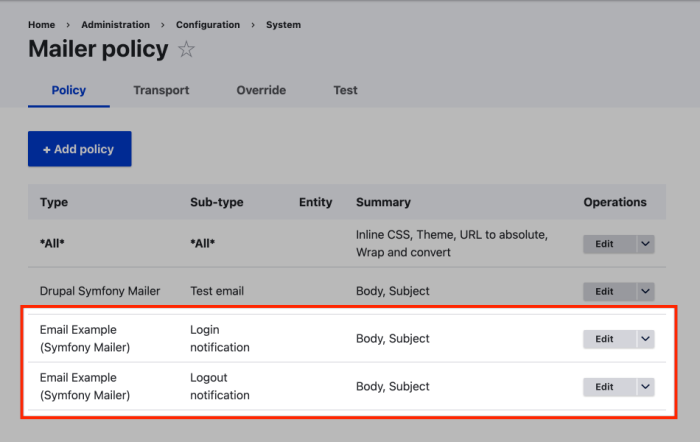
Next, we add one method per email. Each method creates an email with ::newEmail(), sets the recipient, and sends it. The subject and body come from the matching mailer policy, so the method stays short.
# In the class CustomEmailExampleMailer.
public function login(UserInterface $account): bool {
  return $this->newEmail('login')
    ->setTo($account->getEmail())
    ->send();
}

public function logout(AccountInterface $account): bool {
  return $this->newEmail('logout')
    ->setTo($account->getEmail())
    // This will be available as a Twig variable in the email body.
    ->setVariable('account', $account)
    ->send();
}
This is my favourite part of the new API. Calling code no longer passes around magic strings like 'custom_email_example', 'login'; it calls $mailer->login($account), and your IDE knows exactly what that is. 😎
Step 2: Register the mailer as a service
For Drupal to find the mailer, it must be registered as a service. Since the class name is the service ID, the definition is a one-liner. You can use an interface if you want to; since there's only one implementation in my example, I've not created an interface.
# File: custom_email_example/custom_email_example.services.yml
services:
  _defaults:
    autowire: true

  Drupal\custom_email_example\Mailer\CustomEmailExampleMailer: ~
Mailer Plus detects the service through its #[MailerInfo] attribute and injects the base tag into it. You don’t need to tag the service or pass any arguments yourself.
Step 3: Customize emails in ::build()
The ::build() method is called for every email the mailer sends, after ::send() is called and before the email is rendered. It’s the right place for anything that all (or most) of your emails have in common, like default variables.
# In the class CustomEmailExampleMailer.
public function build(EmailInterface $email): void {
  $email->setVariable('ip', \Drupal::request()->getClientIp());

  // The tag is "custom_email_example.logout"; part 1 is the sub-type.
  if ($email->getTag(1) === 'logout') {
    $email->setCc(new Address('r2d2@example.com', 'R2D2'));
  }
}
Why not call ::setCc() in the ::logout() method, right next to ::setTo()? That’s where the phases come in. Every email goes through the phases init, build, post-render, and post-send, and some setters only work in certain phases:
- To: Only during init, i.e. right after
::newEmail(). - Cc, Bcc, Reply-To, and From: Only from build onwards, e.g. in
::build().
LogicException. If you’re porting 1.x code that chained ->setTo() and ->setCc() together, you’ll run into this error.In a real project, you’d inject the request_stack service instead of calling \Drupal::request(). I kept the shortcut here to keep the example small.
Step 4: Provide default policies
Like in 1.x, the mailer doesn’t provide the email content. The subject and body live in mailer policies, which are a part of Drupal’s configuration. Hence, administrators can edit them, and they can be translated using configuration translation.
To provide default content, include the policies in your module’s config/install directory. The policy ID matches the email’s tag from Step 1.
# File: custom_email_example/config/install/mailer_policy.mailer_policy.custom_email_example.login.yml
# ...
id: custom_email_example.login
configuration:
  email_body:
    content:
      value: |-
        <h4>Logged in</h4>
        <p>Hello user.</p>
        <p>This is to notify you that you have logged into your account on <a href="[site:url]">[site:name]</a> from the IP Address <strong>{{ ip }}</strong>.</p>
        <p>Regards.</p>
      format: email_html
  email_subject:
    value: 'Logged into [site:name]'
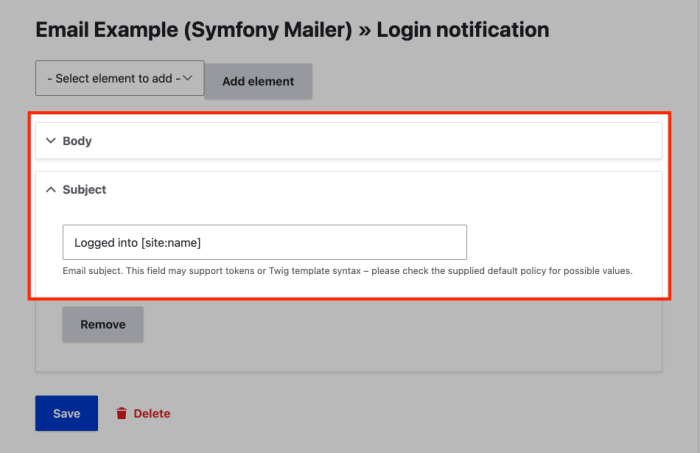
Notice the [site:url] and [site:name] tokens, which work because of token_types, and the {{ ip }} variable that we set in ::build(). Administrators can edit this content at Configuration » System » Mailer Plus » Policy.
Step 5: Send emails
At this point, the heavy-lifting is done! All that’s missing is the code that sends the emails. Since the mailer is a service, you can inject it anywhere: a controller, a form, an event subscriber, or a hook.
Our example sends emails from the user_login and user_logout hooks. On Drupal 11, hooks can be implemented as class methods with the #[Hook] attribute, which means constructor injection works and there is no .module file at all.
# File: custom_email_example/src/Hook/CustomEmailExampleHooks.php
namespace Drupal\custom_email_example\Hook;

class CustomEmailExampleHooks {

  public function __construct(
    protected readonly CustomEmailExampleMailer $mailer,
  ) {}

  #[Hook('user_login')]
  public function userLogin(UserInterface $account): void {
    $this->mailer->login($account);
  }

  #[Hook('user_logout')]
  public function userLogout(AccountInterface $account): void {
    $this->mailer->logout($account);
  }

}
Both mailer methods return a boolean that tells you whether the email was sent. The example on GitHub uses it to show a status message to the user.
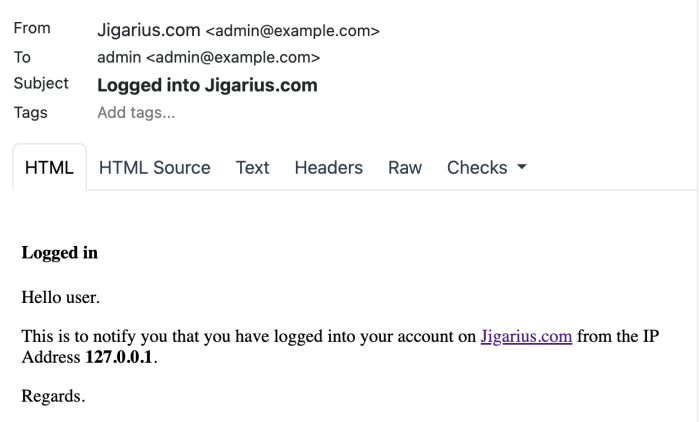
Log in and out of your site, and you should see two emails. Here they are in my Mailpit inbox, which catches emails sent from my local Ddev environment.
Conclusion
Mailer Plus 2.x asks for a little more structure than 1.x: a mailer class, a service definition, and some attention to phases. In return, sending an email is now a plain method call on an injected service, which is easier to read and test.
The parts administrators care about stayed the same. Email content still lives in configurable and translatable mailer policies, so your site builders won’t notice the upgrade, and that’s the way it should be.
Next steps
- See the source code for the examples used in this article.
- Still on Mailer Plus 1.x? Read Sending Emails with Drupal Symfony Mailer.
- Read about the Mailer Plus module.
- Read about object-oriented hooks in Drupal.


